Report Summaries with AI
Overview
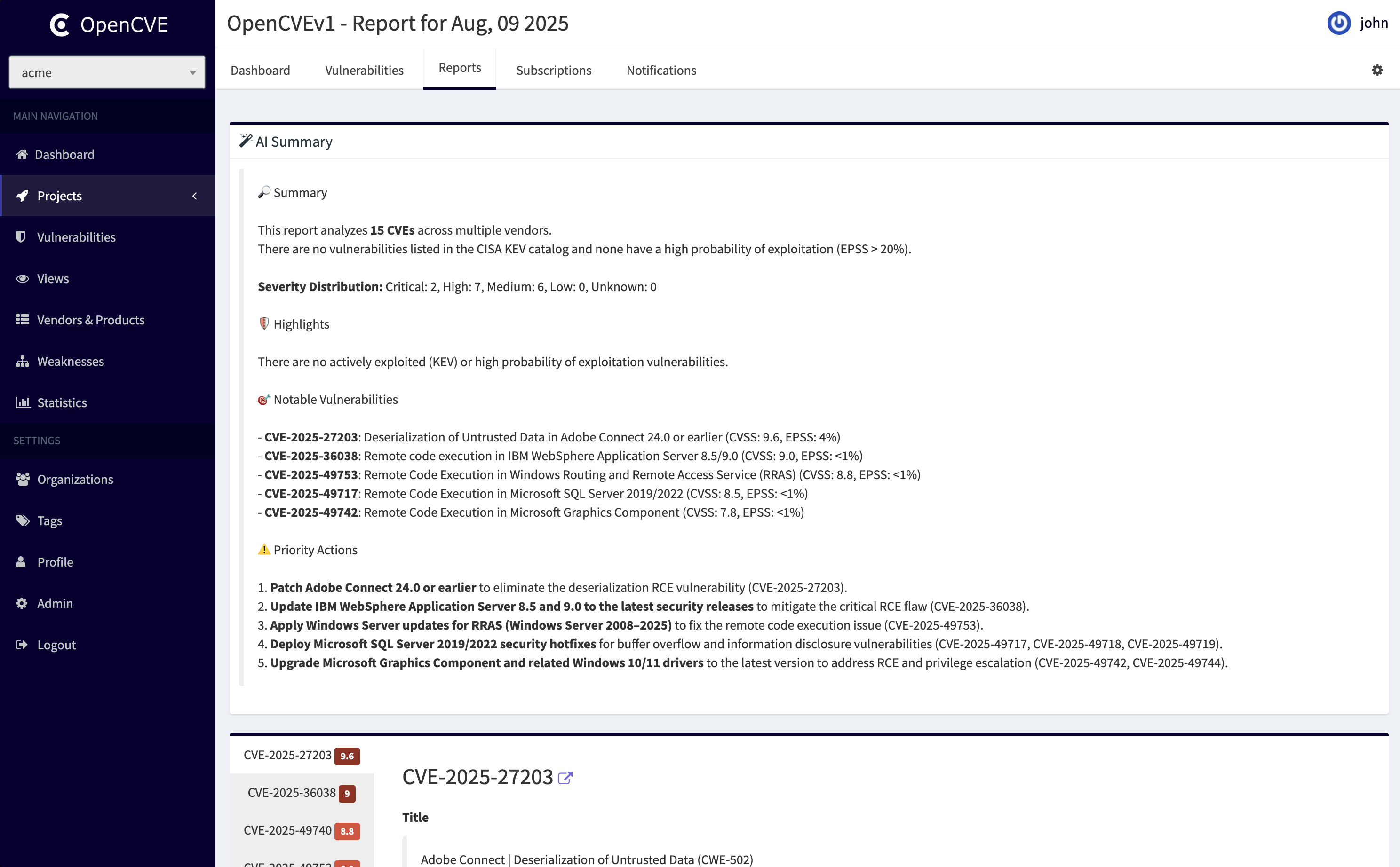
OpenCVE includes a feature that automatically generates daily summaries of reports using a Large Language Model (LLM).
Each night at 2:00 AM UTC, an Airflow DAG (summarize_reports) collects all the reports created the previous day and generates a concise summary for each of them by calling an LLM.
This feature is especially useful for quickly identifying what really matters in the list of CVEs of the day, without having to manually read through each report in full.
Reminder
A report is always linked to a project. It gathers all modifications concerning CVEs related to this project.
A CVE is related to a project when the project is subscribed to at least one of the CVE’s vendors or products.
Availability
Info
On OpenCVE.io, this feature is enabled for Starter, Pro, and Enterprise customers.
If you are using the on-premise version of OpenCVE, you can also enable this feature, provided you have access to an API compatible with the OpenAI API format (Chat Completions endpoint).
Compatible providers include:
- OpenAI (ChatGPT models)
- Anthropic (Claude models via OpenRouter)
- Mistral (Mixtral, Mistral Small, etc.)
- Llama.cpp (local inference with OpenAI-compatible API)
- Ollama (self-hosted LLMs with OpenAI API compatibility)
- Any other API exposing an OpenAI-compatible
/v1/chat/completionsendpoint
Configuration
To enable report summarization on your own deployment, you need to configure the LLM endpoint in your Airflow scheduler.
Edit the file scheduler/airflow.cfg and update the following section:
# The starting date of the summarize_reports workflow
start_date_summarize_reports = 2025-08-28

# The configuration for the LLM
llm_api_key = sk-proj-1234567890
llm_api_url = https://api.example.com
llm_model = Mistral-7B-Instruct-v0.3
llm_api_key: API key used for authentication (set to notused if not required by your provider).llm_api_url: Base URL of your OpenAI-compatible API.llm_model: Identifier of the model to use (provider-dependent).
Activating the DAG
Once the configuration is in place, you need to activate the Airflow DAG named summarize_reports.
You can do this from the Airflow UI:
- Open the DAGs list.
- Locate the DAG
summarize_reports. - Switch it to active.
From now on, every night at 2:00 AM UTC, the summaries of all reports created the previous day will be automatically generated.